By the Long Distance Vibrators editorial team · Updated November 5, 2026
Before you start
- Charge the toy fully.
- Both of you install the free Lovense Remote app. It is on the iOS App Store and Google Play, and there are versions for Windows and Mac.
- Both of you create your own Lovense account. Lovense requires one each for long-distance control.
Step 1: Pair the toy with your phone
- Turn on Bluetooth on your phone.
- Turn the toy on.
- Open Lovense Remote and tap + to search for the toy.
- When the app finds it, tap Done. The toy's light stays on to show it is connected.
Test it yourself with the app's controls before you bring your partner in. If the app offers a firmware update for the toy, install it: Lovense says updates can improve Bluetooth stability.
Step 2: Add your partner as a friend
Open the Long Distance tab and add your partner using their Lovense username or the app's friend-finding options. They accept the request on their side. Your partner does not need a toy for this to work.
Step 3: Hand over control
Open your chat with your partner and share control of your toy. Once they accept, they see controls for your toy on their screen: sliders for intensity, patterns, and options such as music or sound control. You can take control back at any time.
Lovense also offers Control Link, which it describes as a way for your partner to control your toy from anywhere in the world.
Troubleshooting
- The toy keeps disconnecting. Keep your phone close to the toy, keep the app open, and check for a firmware update.
- Your partner's controls lag. Switch from mobile data to stable Wi-Fi on both ends if you can.
- You cannot find your partner. Check the spelling of their username and make sure both of you have accepted the friend request.
- Someone you do not know sends a request. Decline it, and choose to block them when the app asks.
Toys that work with these steps
Every Lovense toy works with Lovense Remote. Prices and ratings from lovense.com.
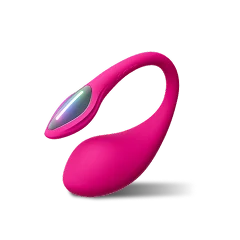
Lovense Lush 4
Wearable G-spot egg vibrator · Best for: Most people, solo or long distance
The toy most people set up first.
The newest version of Lovense's best-known toy: a wearable egg vibrator with an external antenna tail that your partner can control from anywhere through the Lovense Remote app. Compared with Lush 3 it charges faster, runs longer and has a longer Bluetooth range.
- Longest battery life in the Lush range
- Buyers rate vibration strength 5.0/5
- Color-changing LED tail
- Drawback: Costs $10 more than Lush 3
- Battery
- Up to 350 min
- Full charge
- 45–50 min
- Bluetooth range
- Up to 105 m outdoors
- Quietest setting
- 36 dB
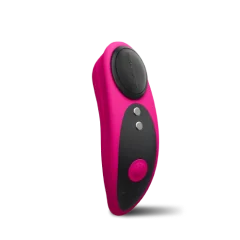
Lovense Ferri
Magnetic panty vibrator · Best for: Discreet wear without insertion
Nothing to insert.
A small clitoral vibrator that clips into your underwear with a magnet, so it stays put while you walk or sit. Nothing is inserted, which makes it the easiest toy here to wear out of the house.
- External only: clips into underwear
- Lightest toy here at 35 g
- Buyers rate ergonomics 5.0/5
- Drawback: External stimulation only
- Battery
- Up to 195 min
- Full charge
- 60 min
- Water rating
- IPX7 waterproof
- Weight
- 35 g
Frequently asked questions
How do I give my partner control of my Lovense toy?
Does my partner need the app to control my Lovense?
How many toys can I connect at once?
Can my partner use a computer instead of a phone?
Ready to close the distance?
Browse Lovense's full range of long-distance toys, bundles and current offers.
Shop Long-Distance Toys at LovenseWe may earn a commission when you buy, at no extra cost to you.